Last researched: November 3, 2026
ShareMyToolbox Alternatives for Tool Tracking (November 2026)

By SuntharFounder of OrbitEquip
ShareMyToolbox is a capable contractor-focused tool tracking platform with QR and barcode scanning, assignments, unlimited tools, locations, kits, consumables, audits, maintenance reminders, due dates, reporting and mobile apps.
The right alternative depends on your workflow: straightforward QR custody, broader asset management, connected hardware, job costing or enterprise operations.
This guide compares five ShareMyToolbox alternatives:
- OrbitEquip for straightforward QR tool custody without per-user pricing
- AssetTiger for broader low-cost asset management
- GoCodes for QR-based asset tracking with supplied tags and additional tracking options
- Hilti ON!Track for connected tools, equipment, and hardware-assisted tracking
- ToolWatch by AlignOps for larger contractors needing deeper tool-room and operational workflows
Want the broader category view first? Read our best tool tracking software comparison.
Disclosure and methodology
OrbitEquip publishes this comparison and is one of the products included.
We compared products using current official pricing pages, product pages, help documentation, and first-party product information. We focused on criteria that matter to contractors managing shared tools: check-in/out, QR or barcode scanning, user and asset limits, locations, maintenance, audits, field access, kits or consumables, integrations, and pricing structure.
We did not conduct a hands-on test of every competing platform. Pricing and product details last verified: November 3, 2026. Competitor terms can change.
Quick comparison of ShareMyToolbox alternatives
| Product | Best fit | Starting price* | Pricing basis | QR/barcode | Check-in/out | Due/overdue | Maintenance | Kits/consumables | Important limitation |
|---|---|---|---|---|---|---|---|---|---|
| ShareMyToolbox | Contractor-focused tool sharing | No free plan; 14-day Business trial; from $100/mo for the first admin | Base subscription + connections | QR + barcode | Yes | Yes | Yes | Yes | $10 per extra Employee/Admin, in blocks of 5 |
| OrbitEquip | Contractors needing straightforward QR tool custody | Free for 25 tools; paid from $15/mo | Asset capacity | QR + existing-barcode identification/search | Yes | Optional due dates, overdue visibility and checkout reminder emails | Recurring schedules and maintenance reminder emails on active Starter-or-higher subscriptions | One primary asset photo | Focused custody rather than inventory modules |
| AssetTiger | Broader low-cost asset management | $20/mo for 500 assets after trial | Asset count | Yes | Yes | Yes | Scheduled maintenance | Inventory available separately | Less contractor-specific |
| GoCodes | QR-first asset tracking with supplied tags and optional extensions | $550/yr for 200 assets / 3 users | Assets + users | QR + barcode | Yes | Yes | Yes | Kitting is an add-on | User limits and paid add-ons |
| Hilti ON!Track | Connected construction assets, equipment, vehicles and tools | Contact Hilti | Consultative/custom | Supports tagged asset workflows | Yes | Varies by workflow | Yes | Consumables supported | More involved deployment |
| ToolWatch / AlignOps | Larger contractors and tool rooms | Contact vendor | Plan / deployment dependent | Yes | Yes | Advanced workflow dependent | Service schedules and work orders on Pro; custom reports/SSO on Enterprise | Materials and quantity workflows | More operational complexity |
*Prices shown are public prices available at the time of research where published.
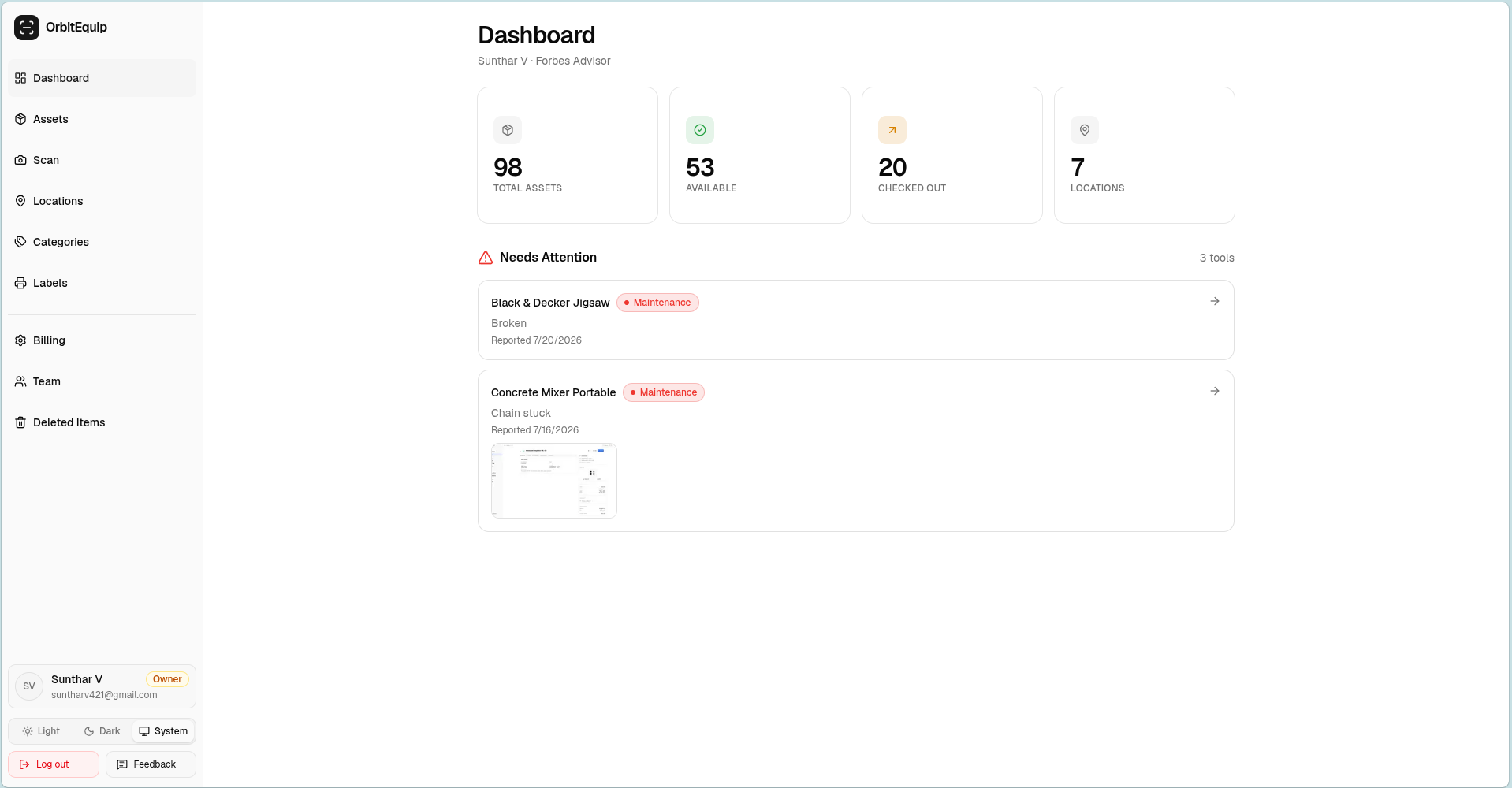
Only need straightforward QR check-in/out?
Try OrbitEquip free with up to 25 tools.
Unlimited users, no credit card, browser-based scanning.
Why look for a ShareMyToolbox alternative?
There is no single reason to replace or avoid ShareMyToolbox.
For some contractors, ShareMyToolbox may already be the right choice. Its current paid plan includes unlimited tools, QR and barcode scanning, multiple locations, GPS capture on scans, reporting, attachments, kits, consumable inventory, quantity items, audits, API access, and iOS and Android apps.
It also supports optional due dates, overdue dashboards and alerts, plus maintenance and calibration reminders.
An alternative becomes worth considering when your requirements differ.
You want a narrower system
A 15-person electrical contractor that mainly needs to answer:
Who has this tester?
may not need the same feature depth as a company managing kits, consumables, audits, calibration schedules and several types of inventory.
You want a different pricing model
ShareMyToolbox combines a base subscription with paid Employee/Admin connections, while other products price by asset count, bundled assets and users, or custom deployment.
The lowest monthly price does not automatically mean the lowest total cost. Compare pricing using your actual number of tools and people who need access.
You need more general asset-management functionality
ShareMyToolbox is contractor-focused.
Products such as AssetTiger extend further into general asset management, contracts, depreciation, audits, reporting, insurance, warranties, and other administrative workflows.
You need hardware-assisted location tracking
QR codes record information when someone scans them.
If you need GPS devices, Bluetooth tags, vehicle gateways, or automated location signals, a system such as Hilti ON!Track addresses a different problem. Hilti currently offers connected tags and gateways for tools, vehicles and larger equipment alongside its asset-management software.
You need enterprise tool-room operations
Larger contractors may care about purchase orders, work orders, service schedules, job costing, billing, field requests, equipment usage, custom reports, SSO and more formal tool-room processes.
ToolWatch offers those broader workflows on higher AlignOps plans.
1. OrbitEquip — for straightforward QR tool custody
Bottom line
OrbitEquip is the narrower alternative in this comparison.
It focuses on individually identifiable tools: add or import assets, print QR labels, scan from a phone browser, check tools in and out, record the current holder and location, and keep history.
It does not currently try to reproduce every ShareMyToolbox workflow.
That can be useful if your main problem is simply:
Who has this tool, and where should it be?
Where OrbitEquip fits
OrbitEquip is designed for small and midsize field teams where tools move between:
- Employees
- Vans
- Warehouses or shops
- Jobsites
- Different company locations
This is a natural fit to evaluate for electrical contractors, HVAC teams, and plumbing crews that share serialized tools between people and vehicles.
The current product supports asset records, canonical OrbitEquip QR labels, browser-based check-in/out, categories, assigned locations, current holder and checkout history, optional return due dates, overdue visibility, checkout reminder emails, reactive maintenance issues with photos, one-time planned maintenance, recurring preventive-maintenance schedules with pause/resume and next occurrences, maintenance reminder emails for eligible scheduled occurrences on active Starter-or-higher subscriptions, physical inventory audits on active Starter-or-higher subscriptions, one private primary asset photo, and optional existing/manufacturer barcode identification and search. Free organizations can view audit history and continue an audit already in progress. Current OrbitEquip pricing lists the plan limits.
OrbitEquip V2 is generally available. Free includes CSV import within the 25-asset limit and five fixed operational reports. An active Starter-or-higher subscription adds filtered CSV export, starting a new physical audit, creating a new recurring-maintenance schedule, and Maintenance Reminder Emails; existing audits and recurring schedules remain available on Free.
Members can scan from a phone browser without installing a native app; they still sign in to view the organization's asset and take an action. See our QR code tool tracking guide for that workflow.
That keeps the field interaction centered on a relatively small loop:
Scan → assign → set due back when needed → follow up when overdue → check it back in
How OrbitEquip differs from ShareMyToolbox
The most important difference is not that one is universally simpler or better.
It is scope.
ShareMyToolbox covers broader contractor inventory workflows, including kits, consumables, quantity items, maintenance/calibration reminders, field audits, attachments and API access. Both products support due dates, overdue follow-up, physical audits and maintenance reminders; OrbitEquip checkout and maintenance reminder emails are available on active Starter-or-higher subscriptions.
OrbitEquip focuses on serialized-tool custody, return accountability and recurring preventive-maintenance schedules.
That makes OrbitEquip more relevant when you need browser-based custody, return accountability and maintenance schedules without the broader inventory modules.
OrbitEquip pricing
| Plan | Price | Asset limit | Users |
|---|---|---|---|
| Free | $0 | 25 | Unlimited |
| Starter | $15/mo | 500 | Unlimited |
| Pro | $35/mo | 2,500 | Unlimited |
| Business | $70/mo | 10,000 | Unlimited |
OrbitEquip prices primarily by asset capacity rather than the number of people who use the system.
ShareMyToolbox has no free plan. Its Business plan includes a 14-day trial with no credit card, then starts at $100 per month for the first admin, plus $10 per additional Employee or Admin, sold in blocks of five. Business includes unlimited tools.
Neither pricing structure is automatically better.
A company with many employees and a moderate number of tracked tools may prefer asset-based pricing.
A company with a very large tool inventory but relatively few connected users may value ShareMyToolbox's unlimited-tool model.
Where OrbitEquip has a narrower scope
OrbitEquip supports due-back accountability, physical inventory audits, recurring schedules and maintenance reminders on active Starter-or-higher subscriptions. It does not include:
- Kits or bundles
- Consumable/quantity inventory
- GPS tool tracking
- Offline operation
- ERP or accounting integrations
- Generalized work-order or full CMMS workflows
Those are material differences.
If any of them is a core requirement, ShareMyToolbox or another alternative in this guide may fit better.
Choose OrbitEquip if...
OrbitEquip is worth evaluating if:
- You mainly track serialized reusable tools;
- Crews need basic equipment checkout software;
- Unlimited users matter;
- You want workers to scan QR labels through a phone browser;
- You do not need a larger inventory or maintenance-management platform;
- Your tool count fits comfortably within OrbitEquip's plans.
Skip OrbitEquip if...
Choose something else if:
- You need consumables or quantity stock;
- You manage kits;
- You need GPS or offline-first operation;
- You need kits, quantity stock, ERP integrations or generalized work orders;
- You need GPS/Bluetooth tracking;
- You need deep integrations or enterprise procurement workflows.
Want to test the narrower workflow?
OrbitEquip's Free plan supports up to 25 assets, so you can try the check-in/out process with real tools before deciding whether it fits your operation.
2. AssetTiger — for broader low-cost asset management
Bottom line
AssetTiger is one of the strongest ShareMyToolbox alternatives for buyers who want broader asset-management functionality without moving into enterprise pricing.
Its scope extends well beyond basic tool custody.
Why AssetTiger stands out
AssetTiger's current paid plans all include unlimited users and are priced by asset count.
Current monthly prices are:
- Price: $20 for 500 assets
- Price: $40 for 2,500 assets
- Price: $75 for 10,000 assets
- Price: $140 for 50,000 assets
- Price: $275 for 250,000 assets
A 30-day trial supports up to 250 assets.
Paid plans currently include features such as:
- Barcode and QR scanning
- Check-in/check-out
- Maintenance scheduling
- Custom fields
- Bulk import/export
- Document attachments
- Physical audits/reconciliation
- Reporting
- Contracts and warranties
- REST API
- Mobile apps
- Configurable permissions
That is substantial functionality at its price point.
AssetTiger vs ShareMyToolbox
The difference is partly specialization.
ShareMyToolbox is built around contractors sharing tools among employees, vans and locations.
AssetTiger is a broader asset-management platform that can also handle construction tools.
That broader scope may be attractive if your business tracks:
- Office equipment;
- IT assets;
- Vehicles;
- Contracts;
- Insured assets;
- Leased equipment;
- Tools;
- Other company property.
AssetTiger's unlimited-user paid model may also appeal to companies that want many employees to access the system without paying per seat.
Choose AssetTiger if...
Consider AssetTiger if:
- You want one platform for more than contractor tools;
- Audits and reconciliation matter;
- Preventive maintenance matters;
- Contracts, depreciation or other asset-lifecycle workflows matter;
- You want unlimited users;
- You want a low-cost but relatively feature-rich system.
Skip AssetTiger if...
Look elsewhere if your priority is a very narrowly contractor-focused workflow rather than general asset management.
3. GoCodes — for QR tracking with supplied tags and more tracking options
Bottom line
GoCodes is a strong option for businesses that like QR-based tracking but want a broader tracking package, including supplied QR labels on higher plans, offline work, API access and kitting. Work offline is a $385/yr add-on on Standard, Premium and Premium Elite, and is included with Professional.
GoCodes pricing
Current public pricing starts at:
| Plan | Annual price | Assets | Included users |
|---|---|---|---|
| Standard | $550 | 200 | 3 |
| Premium | $1,100 | 500 | 5 |
| Premium Elite | $1,950 | 1,000 | 10 |
| Professional | $2,750 | 2,000 | 20 |
| Enterprise | Custom | Custom | Custom |
GoCodes' pricing page lists annual plans, each with a 15-day free trial and no credit card. Add-ons: API access $1,200/yr, Work offline $385/yr, Kitting $275/yr, Data Migration $175 one-time, and additional users at $440/yr per 5 users. Prices updated November 3, 2026 from gocodes.com/pricing.
Why GoCodes stands out
GoCodes combines software with asset-label deployment.
Its higher plans include custom QR tags, while the Standard plan allows users to print their own. Every GoCodes tier includes GPS location on scan, per its pricing page. Optional GPS trackers for real-time equipment location are also listed there.
Confirm app and hardware requirements with GoCodes; its pricing page does not list them.
GoCodes vs ShareMyToolbox
Both products address field-based asset tracking, but they package the problem differently.
ShareMyToolbox is heavily centered on contractor tool sharing, employee assignments and related inventory workflows.
GoCodes places more emphasis on QR labels, asset identification, additional location options and optional extensions.
Its pricing also combines asset and user allowances rather than offering unlimited paid users.
Choose GoCodes if...
GoCodes may be a better fit if:
- You want vendor-supplied QR labels;
- You want QR tracking plus optional GPS trackers;
- Your asset and user counts fit its plan structure;
- You need offline access (a $385/yr add-on, or included with Professional) or API access ($1,200/yr add-on);
- You prefer a more developed asset-tracking platform over a narrower custody tool.
Skip GoCodes if...
It may be less attractive if:
- You have many users and want unlimited seats;
- You want to minimize paid add-ons;
- Your requirement is only simple QR custody tracking.
4. Hilti ON!Track — for connected tools, vehicles and equipment
Bottom line
Hilti ON!Track addresses a broader construction asset-management problem than OrbitEquip or a simple QR checkout system.
It is especially relevant when you want software combined with connected devices, automated inventory visibility, equipment location signals and construction-specific integrations.
Why Hilti ON!Track stands out
Hilti describes ON!Track as a construction asset-management platform for managing tools, equipment, consumables and other assets, including equipment from manufacturers other than Hilti.
Its current hardware ecosystem includes:
- GPS gateways for heavy equipment;
- Vehicle gateways;
- Smart tags that report last-known location;
- GPS tags for machinery and trailers.
Vehicle gateways can also perform remote inventory checks for connected assets and generate alerts around unexpected item movement.
Hilti also offers ON!Track Unite APIs for integrations and syncing information such as assets, employees, locations and transfer data with other systems.
Hilti ON!Track vs ShareMyToolbox
This comparison is less about which software has more checkboxes.
The products address different levels of tracking.
ShareMyToolbox is well suited to employees actively borrowing and assigning tools.
ON!Track becomes more relevant when a contractor wants deeper asset visibility supported by connected hardware and a broader construction technology ecosystem.
Hilti also uses a consultative onboarding approach: prospective customers can arrange an analysis, after which Hilti configures the system and provides training and support.
Pricing
On the Hilti AI T320 product page we reviewed, ON!Track features require an active subscription that varies by bundle, and no subscription price is listed there.
Contact Hilti for pricing.
Choose Hilti ON!Track if...
Consider it if:
- Connected hardware is important;
- Vehicle or heavy-equipment tracking matters;
- Automated asset-location signals matter;
- You already use Hilti's broader ecosystem;
- Integrations and construction-specific infrastructure justify a more involved implementation.
Skip Hilti ON!Track if...
It may be more than you need if your problem is simply recording which employee checked out which hand tool.
5. ToolWatch by AlignOps — for larger contractor operations
Bottom line
ToolWatch sits at the enterprise-operations end of this comparison.
It goes beyond basic inventory custody into areas such as service schedules, work orders, purchasing, billing, job costing, field requests, usage tracking, workflows and advanced reporting.
Why ToolWatch stands out
AlignOps currently offers ToolWatch in Essentials, Pro and Enterprise tiers.
The Essentials tier includes:
- Catalog management;
- Tool tracking;
- Equipment management;
- Inventory verification;
- Pick tickets and transfers;
- Dashboards and reports;
- Roles and permissions;
- Notifications;
- Onboarding and training.
The Pro tier adds:
- Service schedules;
- Work orders;
- Purchase orders;
- Requests from the field;
- Billing and invoicing;
- Fuel transactions;
- Equipment usage logs;
- Location maps;
- Workflow tools.
Enterprise adds capabilities including custom reports and dashboards and SSO.
ToolWatch also supports detailed job-cost and billing mechanisms based on how equipment is assigned and used.
ToolWatch vs ShareMyToolbox
ShareMyToolbox is generally easier to understand as a contractor tool-sharing system.
ToolWatch addresses broader operational control.
A company running a formal warehouse or tool crib, allocating equipment costs to projects, managing service work and handling purchasing may find those deeper workflows more important than ShareMyToolbox's simpler sharing model.
Pricing
AlignOps publishes plan contents but does not show a simple self-service ToolWatch price on its current pricing page.
Contact vendor for pricing.
Choose ToolWatch if...
Consider ToolWatch if:
- Your tool room is a formal operational function;
- You need purchasing and work orders;
- Internal job costing or equipment billing matters;
- You have substantial reporting requirements;
- You need enterprise permissions or SSO;
- ShareMyToolbox feels too lightweight rather than too broad.
Skip ToolWatch if...
Smaller contractors that mainly want workers to scan tools in and out may not need this level of operational depth.
Should you actually replace ShareMyToolbox?
Sometimes the right answer is no.
Use the workflow you need to make the decision.
Stay with or choose ShareMyToolbox if...
ShareMyToolbox remains a strong fit when you need several of these together:
- Unlimited tools;
- Contractor-focused employee borrowing;
- Kits;
- Consumables;
- Quantity items;
- Due dates and overdue alerts;
- Maintenance/calibration reminders;
- Audits;
- Multiple photos and document attachments;
- Native iOS and Android apps;
- API access;
- Multiple locations.
Switching to a narrower platform would mean giving up functionality.
Consider OrbitEquip if...
Your workflow is mostly:
identify a reusable tool → scan it → assign it → know who has it → return it.
OrbitEquip is especially relevant when unlimited users, low entry pricing and a browser-based QR workflow matter more than advanced inventory modules.
Consider AssetTiger if...
You want broad asset management without paying per user.
It is particularly strong when audits, maintenance, reporting and non-tool assets matter alongside contractor equipment.
Consider GoCodes if...
You want QR-centric asset tracking with supplied labels, offline access on a suitable plan or add-on, API integration, kitting, or optional GPS trackers.
Consider Hilti ON!Track if...
Physical tracking infrastructure matters.
ON!Track is the more relevant option when gateways, smart tags, connected assets, vehicle inventory and construction-system integrations are part of the requirement.
Consider ToolWatch if...
You are moving in the opposite direction and need more operational depth: purchasing, work orders, service scheduling, usage tracking, job costing, billing or enterprise reporting.
How to choose a ShareMyToolbox alternative
Before booking demos or importing your full inventory, answer five questions.
1. What exactly are you tracking?
There is a major difference between:
- Serialized power tools (300);
- Consumable parts (5,000);
- Tool kits;
- Fleet vehicles;
- Heavy equipment;
- IT assets.
A system optimized for one of these may be awkward for another.
2. Do you need custody or actual location tracking?
QR scanning records a tool's state when someone interacts with the label.
It does not continuously tell you where a tool physically is.
If the actual requirement is locating trailers, vehicles or expensive equipment without relying on employee scans, look at connected GPS/Bluetooth options instead.
3. How many people need access?
Calculate cost using the real number of admins, employees and viewers.
ShareMyToolbox's Business pricing includes unlimited tools but paid Employee/Admin connections.
OrbitEquip and AssetTiger take asset-capacity-based approaches with unlimited paid-plan users. GoCodes bundles particular asset and user counts.
These models can produce very different costs as your team grows.
4. What will field employees actually do?
A tool-tracking system only produces useful custody data if workers consistently use the workflow.
Look closely at:
- Number of steps;
- Whether workers need accounts;
- Whether an app must be installed;
- Scanning speed;
- Connectivity;
- What happens when employees forget to scan.
Implementation and employee adoption are especially important for contractor technology. OrbitEquip's product strategy intentionally prioritizes a short field workflow rather than broader enterprise functionality.
5. Which features would actually stop you from buying?
Separate genuine requirements from feature-list appeal.
For example:
“We need return dates because rental tools must come back every Friday.”
is a requirement.
“It would be nice to have 80 report types.”
may not be.
Buy the smallest system that reliably handles the workflows your business actually needs, while leaving enough room for foreseeable growth.
Switching from ShareMyToolbox? Book a free 15-minute setup call and send your export.
We'll import your tool list into OrbitEquip with you on the call. The import covers name, category, location, status, notes, serial number and existing barcode. History, custom fields, photos and attachments don't move. Owners and Admins run the import, and your plan's asset limit applies (Free: 25 tools).
Frequently asked questions
What is the best ShareMyToolbox alternative?
There is no universal best replacement.
OrbitEquip fits straightforward serialized-tool custody. AssetTiger offers broader low-cost asset management. GoCodes combines QR tracking with tags and optional tracking extensions. Hilti ON!Track is stronger when connected hardware matters. ToolWatch addresses larger contractor and tool-room operations.
If you need kits, consumables, audits, maintenance/calibration reminders and native apps together, ShareMyToolbox itself may remain the better fit.
Is there a cheaper alternative to ShareMyToolbox?
Yes, depending on your team and asset count.
OrbitEquip currently starts with a free 25-asset plan and paid plans from $15 per month.
AssetTiger starts at $20 per month for 500 assets after its trial.
ShareMyToolbox has no free plan. Its Business plan includes a 14-day trial with no credit card, then starts at $100 per month for the first admin, plus $10 per additional Employee or Admin, sold in blocks of five.
Compare total cost using your actual user and tool counts rather than comparing starting prices alone.
Does ShareMyToolbox support QR codes?
Yes.
Yes. ShareMyToolbox lists barcode and QR-code scanning on its Business plan. It has no free plan; Business includes a 14-day trial with no credit card, then starts at $100/month for the first admin.
Is ShareMyToolbox better than OrbitEquip?
They serve overlapping but different levels of need.
ShareMyToolbox provides broader contractor workflows, including kits, consumables, quantity items, maintenance/calibration reminders, audits, attachments and API access. It also supports due dates and overdue alerts, which OrbitEquip now supports through optional return dates, overdue visibility and checkout reminder emails.
OrbitEquip focuses on contractor tool custody with browser-based QR check-in/out, recurring preventive-maintenance schedules, one primary asset photo, optional existing/manufacturer barcode identification/search and asset-capacity pricing with unlimited users.
ShareMyToolbox may fit better when its additional inventory and field workflows matter. OrbitEquip is worth considering when focused custody and return accountability match the job.
Can I track tools without installing an app?
Yes, with some products.
OrbitEquip provides a phone-browser QR scan workflow for signed-in members and does not require a native app.
GoCodes' materials describe smartphone-camera QR scanning. Confirm app and hardware requirements with GoCodes.
Other products in this comparison provide dedicated mobile applications or combine apps with additional hardware.
Sources
- ShareMyToolbox — pricing and plan comparison, FAQ, and tool-tracking overview.
- AssetTiger — pricing, features, and REST API documentation.
- GoCodes — pricing, official facts page (offline add-on price), features, and QR scanning documentation.
- Hilti — ON!Track product information, supported hardware, and ON!Track Unite integrations.
- AlignOps — ToolWatch plans, product details, and job-cost and billing documentation.
A simpler tool tracker may be enough
Need kits, quantity inventory, or generalized work orders? ShareMyToolbox may be the better fit.
If you mainly need to know who has each reusable tool, try OrbitEquip with up to 25 real tools free.
About the author
Sunthar
Founder of OrbitEquip
Sunthar is the founder of OrbitEquip, where he’s building simpler tool and equipment management software for contractors and trade teams. He writes about tool accountability, QR-based check-in and check-out, and practical ways to keep track of shared equipment across teams and jobsites.
View author profile