Last researched: October 2, 2026
GoCodes Alternative: OrbitEquip vs. GoCodes for Tool Tracking

By SuntharFounder of OrbitEquip
If you are comparing GoCodes and OrbitEquip, the first question is not “Which one has more tracking features?”
It is:
“Do you need a focused tool-custody workflow, or a broader asset-tracking system?”
GoCodes is a broader QR and barcode asset-tracking platform with GPS-on-scan, optional continuous GPS hardware, offline workflows, custom tags, custom fields, maintenance and work orders, calibration, kitting, inventory, depreciation, native apps and API options. OrbitEquip focuses on contractor tool custody: optional return due dates, overdue visibility, checkout reminder emails, recurring preventive-maintenance schedules, one private primary asset photo, and optional existing/manufacturer barcode identification/search, with OrbitEquip QR as the canonical custody identifier.
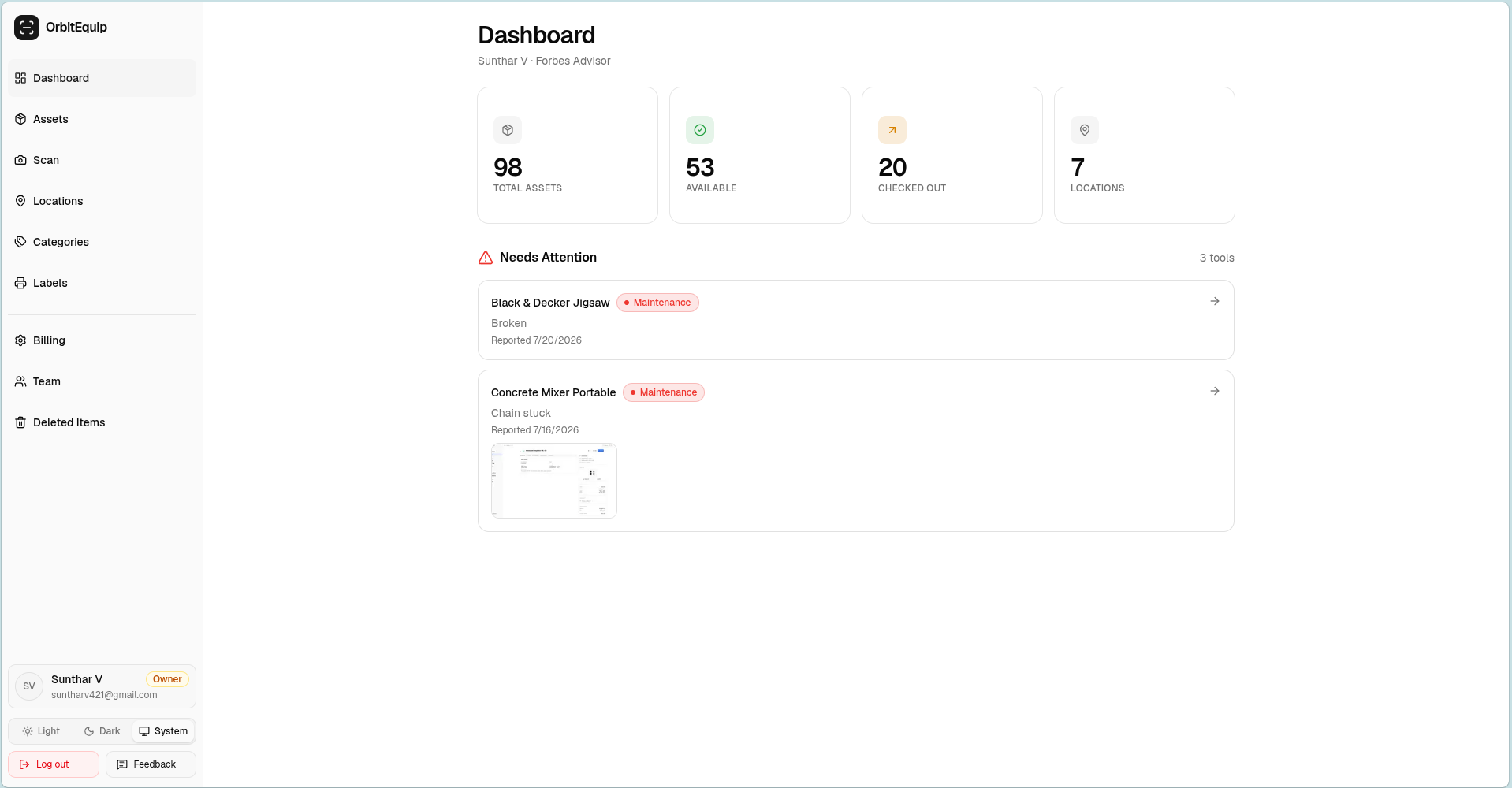
OrbitEquip is a focused browser-based tool-custody workflow for contractors who need to:
- Create tool records and print canonical OrbitEquip QR labels,
- Check tools in and out from a phone browser,
- Set due-back dates, see overdue items and send checkout reminder emails,
- See current holder, assigned location and checkout history,
- Report maintenance issues with photos and status,
- Schedule recurring preventive maintenance with pause/resume and next occurrences,
- Add one private primary asset photo, and
- Store and search optional existing/manufacturer barcodes.
Quick verdict: GoCodes may be the stronger fit if you need GPS, offline operation, barcode camera scanning, custom or rugged tags, custom fields, deeper maintenance work orders, parts/service management, calibration, kitting, quantity inventory, depreciation, native apps or integrations. OrbitEquip fits teams that need custody, due-back accountability and recurring maintenance schedules without those broader workflows.
That distinction is the starting point for evaluating construction equipment management software. For a broader category overview, see our best tool tracking software comparison.
Disclosure:OrbitEquip publishes this comparison and is one of the products discussed. GoCodes facts were researched from current GoCodes documentation and official product materials. I have not conducted a hands-on GoCodes product test, so this comparison does not claim firsthand experience where none exists. We explicitly identify situations where GoCodes is the better fit.
OrbitEquip vs. GoCodes at a glance
| Feature | OrbitEquip | GoCodes |
|---|---|---|
| Best suited to | Contractors wanting focused QR tool custody | Teams needing broader QR/location-enabled asset tracking |
| QR scanning | Yes | Yes |
| Identification and barcode scanning | OrbitEquip QR is canonical; optional existing/manufacturer barcode identification and search | QR and barcode camera scanning |
| Browser-based scanning | Yes | Yes |
| Native mobile apps | No | Yes, iOS and Android |
| Check-in / check-out | Yes | Yes |
| Current holder / history | Yes | Yes |
| Printable / self-made labels | Yes | Standard supports print-your-own |
| Custom supplied QR tags | No supplied hardware | Included on applicable GoCodes tiers |
| Rugged / metal tags | No | Available |
| GPS location on scan | No | Yes |
| Continuous GPS tracking | No | Optional GPS hardware/service |
| Bluetooth / BLE | No | Available |
| RFID / NFC | No | Available in broader offering |
| Offline mode | No | Professional includes it; Standard, Premium and Premium Elite list it as a $385/year add-on |
| Custom fields | No user-defined fields | Yes |
| Maintenance issue reporting | Yes | Yes / maintenance workflows |
| Recurring preventive maintenance scheduling | Starter+ can create new schedules; existing schedules continue on Free | Yes, with broader work-order workflows |
| Checkout return accountability | Optional due dates, overdue visibility and checkout reminder emails | Checkout workflows; confirm due-date and notification fit |
| Maintenance reminder emails | Eligible scheduled occurrences on active Starter-or-higher subscriptions | Verify notification setup and plan |
| Primary asset photo | One private primary asset photo | Photo/media options in broader asset records |
| Calibration tracking | No | Yes |
| Kitting | No | Professional or applicable add-on |
| Depreciation | No | Yes |
| Inventory module | No consumables / stock system | Yes |
| REST API | No public customer API | Enterprise and/or applicable paid add-on arrangement |
| Users | Unlimited | 3/5/10/20 by plan; Enterprise unlimited |
| Free option | Permanent free plan, 25 tools | 15-day trial |
| Entry paid price | $15/month, 500 tools | $550/year, 200 assets |
| Billing | Monthly or yearly plans | Annual pricing |
Only need QR check-in/out?
Try OrbitEquip free with up to 25 tools.
Unlimited users. Browser-based scanning. No credit card required.
Which one should you choose?
Choose OrbitEquip if:
- Your main problem is tools moving between employees, vans, jobsites or a tool crib.
- You want crews to scan a QR code without installing a dedicated OrbitEquip app.
- You need check-in/out, current holder, assigned location and history.
- You need optional return due dates, overdue visibility and checkout reminder emails.
- Recurring preventive-maintenance schedules and maintenance reminder emails on active Starter-or-higher subscriptions are enough without work-order/parts management.
- You need a straightforward tool-custody record rather than a broader asset-operations platform.
- You do not need purchasing, inventory or accounting inside your tool-tracking software.
- You do not need GPS, continuous tracking, Bluetooth, RFID/NFC or offline mode.
- You want transparent, self-serve pricing and unlimited users.
- You want to start free with up to 25 tools and no credit card.
Choose GoCodes if:
- You need GPS location captured at scan time or continuous GPS hardware for selected assets.
- You need barcode camera-scanning workflows, native mobile apps or offline operation.
- You need supplied custom QR tags, rugged tags, BLE, RFID or NFC options.
- You need custom fields and richer asset records.
- You need formal calibration compliance, deeper work orders or service/parts workflows.
- You need kitting, inventory, depreciation or materials-related tracking.
- You need API access, SSO, custom integrations or broader administration.
- You are willing to evaluate annual pricing, user limits and applicable add-ons.
If those capabilities are requirements, OrbitEquip is not a like-for-like replacement for GoCodes.
“Who has the tester, laser, pump or bender right now?”
For a contractor whose recurring problem sounds like that, OrbitEquip is designed around answering it quickly through a QR scan and a current-holder record.
The biggest difference: custody versus asset operations
GoCodes is an asset-tracking platform
GoCodes starts with QR and barcode identification, then extends into location signals, hardware options and broader asset operations. Its public materials describe workflows for:
- Asset check-in/out and transfers,
- GPS-on-scan location capture,
- Optional continuous GPS hardware,
- Offline mobile work,
- Custom and rugged tags,
- Maintenance and calibration,
- Kitting, inventory and depreciation,
- Reports, files and custom fields, and
- API and integration options.
That broader scope is why GoCodes belongs on a shortlist for teams evaluating construction equipment management software, not only a basic checkout application.
OrbitEquip is a tool-custody system
Scan → assign → set due back when needed → follow overdue items → check in → maintain
OrbitEquip is designed to answer questions such as:
- What tools do we own?
- Where does this tool belong?
- Is it available?
- Who currently has it?
- When was it checked out?
- Has someone reported an issue with it?
OrbitEquip does not currently provide GPS, offline scanning, native mobile apps, custom fields, formal calibration compliance, kits, quantity inventory, depreciation, ERP/accounting integrations or utilization reporting. It supports recurring preventive-maintenance schedules and maintenance reminder emails for eligible scheduled occurrences on active Starter-or-higher subscriptions, but not generalized work-order management.
Neither approach is universally better. They solve different levels of the problem.
QR and barcode workflows
Both products use scan-based identification, but not the same scan model
GoCodes supports QR codes and traditional barcodes. Teams can use a smartphone camera, browser workflow or native iOS and Android apps depending on how they want the field experience to work. Applicable GoCodes plans can also include custom QR tags, with Standard positioned around printing your own labels.
OrbitEquip is QR-first and browser-first. A team can print a QR label, open the browser on a phone, scan it and record the checkout or return without a native app. OrbitEquip can also store and search an optional existing/manufacturer barcode, including CSV mapping and authenticated lookup. It does not claim manufacturer-barcode camera scanning or sell supplied hardware tags.
If you are specifically comparing QR code tool tracking options, the practical question is whether a deliberately simple QR workflow is enough or whether your labels need to be one part of a wider identification and hardware strategy.
Better suited to a simple browser QR loop: OrbitEquip
Better suited to QR, barcode and hardware variety: GoCodes
Location tracking and GPS
GoCodes: GPS-on-scan and optional continuous hardware
GoCodes can capture the scanning device's GPS location when an asset is scanned. This can provide useful context for where a check-in, check-out or update occurred, subject to the device, permissions and workflow.
GPS-on-scan is a scan event. It does not mean an unscanned asset is continuously reporting its position.
GoCodes also documents separate GPS tracker hardware for continuous updates on selected equipment, trailers, generators or other assets. That is a different product and cost decision from scan-based location capture.
OrbitEquip: assigned logical locations
OrbitEquip uses assigned locations such as Main Warehouse, Van 4, Austin Jobsite or Service Department. A scan or update records what the workflow says about the tool; the QR label does not transmit its physical position.
OrbitEquip does not currently provide:
- GPS-on-scan,
- Continuous GPS,
- Bluetooth or BLE,
- RFID or NFC, or
- Automatic physical-location detection.
Better suited to hardware-assisted location visibility: GoCodes
If the requirement is accountability through intentional scans, OrbitEquip may be sufficient. If the requirement is automatic or scan-assisted location evidence, GoCodes is the better direction to investigate.
Offline field work
Connectivity is a meaningful operational difference
GoCodes describes scanning, viewing asset details, checking items in or out and updating records while disconnected, then syncing changes after reconnection. Professional includes offline mode. Standard, Premium and Premium Elite list Work offline as a $385/year add-on, per GoCodes' pricing page.
OrbitEquip currently requires connectivity for browser-based scanning and check-in/out. A crew can write down a tool code and enter it later, but that is a manual fallback, not offline application support.
Better suited to disconnected jobsites: GoCodes, where the selected plan supports it
Better suited to connected browser simplicity: OrbitEquip
Tags, hardware and identification options
GoCodes offers more physical options
GoCodes supports QR and barcodes, custom printed tags, rugged and metal tag options, BLE beacons, RFID/NFC options and separate GPS hardware. That matters when a label must survive harsh conditions, when scanning volume is high or when an asset needs location signals beyond an intentional QR scan.
The exact tag, tracker, quantity and add-on cost depends on the chosen GoCodes arrangement. A buyer should confirm which hardware is included, what replacement tags cost and whether installation or battery maintenance is required.
OrbitEquip keeps the label decision simple
OrbitEquip works with printable QR labels. You can create the tool record, print or apply a QR label, scan it from a phone browser and keep the custody record in the same workflow.
OrbitEquip does not currently sell supplied QR tags or support rugged metal tags, BLE, RFID/NFC or GPS hardware. The tradeoff is less procurement and hardware complexity for teams that only need a durable-enough QR label and intentional scans.
Recurring schedules versus deeper maintenance workflows
GoCodes supports broader service workflows
GoCodes documents maintenance scheduling, recurring tasks, work-order/service workflows and calibration tracking. Its deeper maintenance model is relevant when teams need formal service records, parts/labor processes or calibration controls as well as a recurring schedule.
This is important for contractors with generators, test instruments, lifts, pumps or other equipment where the question is not only who has the asset, but whether it is due for a defined service or compliance event.
Better suited to work orders, service/parts and calibration workflows: GoCodes
OrbitEquip handles issues and recurring schedules
OrbitEquip lets users:
- Schedule one-time planned maintenance,
- Create recurring preventive-maintenance schedules,
- Pause or resume a recurring schedule,
- Generate the next occurrence after completion,
- Report an equipment issue with a photo,
- Track open, in-progress and resolved status, and
- Retain resolution history.
OrbitEquip supports recurring preventive-maintenance schedules and maintenance reminder emails for eligible scheduled occurrences on active Starter-or-higher subscriptions. It does not provide generalized work orders, parts management or formal calibration-compliance workflows.
If the need is custody plus due-back follow-up, recurring schedules and maintenance reminder emails, OrbitEquip may fit on an active Starter-or-higher subscription. Choose a broader maintenance system when work orders, parts/labor records or calibration controls are required.
Custom fields, kitting and inventory
Custom fields
GoCodes supports custom fields for asset records, allowing teams to capture details beyond a fixed record structure. OrbitEquip currently uses its defined tool fields and does not provide user-created custom fields.
Kitting
GoCodes supports kitting on Professional or through applicable add-on arrangements. That is useful when a crew receives a grouped set such as a service kit, testing kit or mobilization package and the relationship between the items matters.
OrbitEquip tracks tools as individual records rather than managed kits.
Inventory and depreciation
GoCodes extends into inventory and fixed-asset workflows, including depreciation information. OrbitEquip is for serialized or reusable tool custody; it does not provide a consumables inventory, stock-count module or accounting depreciation workflow.
These differences are why a broader GoCodes subscription can be rational for an operation with asset-lifecycle requirements, even when a smaller OrbitEquip plan costs less. The buyer is choosing scope, not just a QR scanner.
API and integrations
Verify API eligibility before designing around it
GoCodes documents REST/JSON API access for integrations. The Help Center says API access is included with Enterprise and can be added to Professional, while the current pricing page also displays API as an optional paid add-on more broadly.
For a purchase decision, the safe statement is: REST API access is available through Enterprise and/or applicable paid add-on arrangements; verify current eligibility with GoCodes.
OrbitEquip currently does not provide a public customer API, SSO integration or ERP/accounting connector. Its current integration boundary is intentionally small: use the browser workflow, and import an existing CSV list on Free within the 25-asset limit or on a paid plan.
Better suited to connected enterprise systems: GoCodes
GoCodes pricing vs. OrbitEquip pricing
OrbitEquip
| Plan | Monthly price | Tool limit | Users |
|---|---|---|---|
| Free | $0 | 25 | Unlimited |
| Starter | $15 | 500 | Unlimited |
| Pro | $35 | 2,500 | Unlimited |
| Business | $70 | 10,000 | Unlimited |
| Enterprise | Custom | Custom | Unlimited |
OrbitEquip includes unlimited users across its current plans.
The Free plan supports up to 25 tools, with no credit card required, and includes CSV import and five fixed operational reports. Existing audits and recurring schedules can continue on Free. Active Starter-or-higher subscriptions add filtered CSV export, starting new physical audits, creating new recurring schedules, and Maintenance Reminder Emails according to the current OrbitEquip pricing page.
GoCodes
| Plan | Annual price | Asset limit | Users |
|---|---|---|---|
| Standard | $550/year | 200 | 3 |
| Premium | $1,100/year | 500 | 5 |
| Premium Elite | $1,950/year | 1,000 | 10 |
| Professional | $2,750/year | 2,000 | 20 |
| Enterprise | Custom | Unlimited | Unlimited |
GoCodes prices updated November 3, 2026 from gocodes.com/pricing.
GoCodes currently publishes annual plan pricing. Standard includes 3 users, Premium 5, Premium Elite 10 and Professional 20; Enterprise lists unlimited users.
The 15-day trial does not require a credit card. Additional users are $440/year per 5 users. Add-ons: API access $1,200/yr, Work offline $385/yr, Kitting $275/yr, Data Migration $175 one-time.
What you gain by paying more for GoCodes
- More assets and users on higher plans,
- Broader hardware and tag options,
- GPS and offline workflows where eligible,
- Maintenance, calibration, kitting and inventory depth, and
- API or integration paths for more connected operations.
What you gain by choosing OrbitEquip
- A permanent free option for up to 25 tools,
- Unlimited users without per-user packs,
- Monthly or yearly self-serve pricing,
- Browser-based QR scanning without native app installation, and
- A smaller workflow with less setup and hardware procurement.
Do not compare $15/month and $550/year as though the products promise the same thing. Compare the cost of the workflow you actually need, including tags, hardware, users, add-ons, implementation and integrations.
Where GoCodes is better than OrbitEquip
GoCodes is the stronger candidate when the tool record needs to participate in a broader asset, location, maintenance or inventory operation.
GPS on scan
Capture scan-derived location when the device and workflow provide GPS permission.
Continuous GPS hardware
Separate GPS trackers can provide ongoing location updates for selected equipment, trailers or generators.
Offline mode
Professional includes offline mode. Standard, Premium and Premium Elite list Work offline as a $385/year add-on. The documented workflow includes scanning, check-in/out and updates that sync after reconnection.
Barcode scanning
GoCodes supports QR/barcode camera-scanning workflows; OrbitEquip stores and searches an optional existing/manufacturer barcode without claiming barcode camera scanning.
Supplied custom tags
Applicable plans include custom QR tags, while Standard supports printing your own labels.
Rugged tag options
Metal and other durable tag options are available when labels need to withstand harsher conditions.
BLE, RFID and NFC
Broader hardware and identification options support different indoor, high-volume and proximity workflows.
Custom fields
User-defined fields allow asset records to capture details beyond a fixed tool-record structure.
Deeper maintenance workflows
GoCodes offers maintenance scheduling and broader service/work-order workflows. OrbitEquip also supports recurring preventive-maintenance schedules and maintenance reminder emails on active Starter-or-higher subscriptions, but not full work orders.
Calibration
Calibration tracking supports equipment with recurring inspection or compliance requirements.
Kitting
Professional or applicable add-on arrangements support grouped equipment and kits.
Inventory
The inventory module extends tracking into stock, materials and quantity-based workflows.
Depreciation
Fixed-asset workflows connect equipment records with depreciation information.
API and integrations
The dedicated pricing page lists REST API access as a $1,080/year add-on and shows it included with Enterprise; confirm the selected plan's current terms.
Native apps
Optional iOS and Android apps are available alongside browser access.
If one or more of these capabilities is a hard requirement, choose GoCodes or another platform with the required depth. OrbitEquip is not intended to imitate those workflows.
Where OrbitEquip is better suited
Illustrative buyer description:
“We do not need an asset-lifecycle project. We need our crews to stop asking who has each tool.”
OrbitEquip's case is much narrower.
It is suited to teams that want:
- A focused check-in/out workflow,
- Browser-based QR scanning from any phone,
- Unlimited users,
- A permanent free option for up to 25 tools,
- Published self-serve pricing, and
- A smaller system that does not require a hardware program.
Less software, for a narrower problem.
Illustrative decision examples
These are illustrative buying scenarios, not OrbitEquip customer case studies or testimonials.
15-person electrical contractor, 300 tools, four service vans
Main need:
Know which technician has each tester, drill, bender or laser.
Needs custody, due-back accountability and recurring maintenance schedules, but no purchasing, ERP, GPS, inventory verification or work-order/parts management.
Start with OrbitEquip.
30-person HVAC company wanting QR accountability
Needs:
Recovery machines, vacuum pumps, diagnostic equipment, technician and van accountability.
OrbitEquip is likely the better first evaluation.
Contractor working in disconnected locations
Needs:
Scan, check tools in or out, add photos and sync changes after connectivity returns.
Confirm GoCodes offline pricing for your plan.
Construction operation with scheduled equipment care
Needs:
Work orders, service/parts history, calibration dates and maintenance notifications.
GoCodes is the stronger candidate.
Multi-division contractor using an ERP
Needs:
API access, inventory, depreciation, user-defined fields and connected financial workflows.
GoCodes or another integration-ready platform.
For an electrical contractor focused on tool custody, our tool tracking guide for electricians provides additional context.
Switching from GoCodes to OrbitEquip
Check the workflow before changing the subscription
Do not switch simply because OrbitEquip has a lower published starting price.
These GoCodes capabilities may prevent a clean migration:
- GPS-on-scan or continuous GPS hardware,
- Offline work,
- Barcode camera scanning and supplied/rugged tag workflows,
- Custom or rugged supplied tags,
- BLE, RFID or NFC,
- Custom fields,
- Generalized work orders and parts/service workflows,
- Calibration tracking,
- Kitting, inventory or depreciation,
- Native mobile workflows,
- API access or integrations,
If GoCodes is primarily being used for:
- Tool records,
- Assigned locations,
- Assignments,
- Check-in/out,
- Custody history,
a simpler product may be worth evaluating.
OrbitEquip supports CSV import on Free within its 25-asset limit and on paid plans, but migration feasibility depends on how the existing GoCodes data is structured and what history, custom fields, tags and location evidence need to be retained.
Do not cancel an existing system until you have confirmed that the workflows, hardware and historical data you depend on can be preserved.
Final verdict
GoCodes is better when:
You want QR or barcode tracking connected with a broader asset and location operation.
That can include:
- GPS-on-scan or continuous GPS hardware,
- Offline field work,
- Custom and rugged tags,
- Maintenance and calibration,
- Kitting, inventory and depreciation,
- Custom fields,
- Native mobile apps,
- API and integrations.
OrbitEquip is better suited when:
The requirement is:
Keep a tool inventory, put QR labels on equipment, let crews check items in and out, and know who currently has what.
If that is the problem you are trying to solve, implementing a broader asset-tracking system may not be necessary.
Start with the equipment checkout workflow, test it with real tools and decide whether the missing capabilities are actually required.
See if the simpler workflow is enough
Start with OrbitEquip's free plan and add a handful of real tools.
Put labels on them, have your crew check them in and out, and evaluate the workflow using your actual equipment.
Free for up to 25 tools. Unlimited users. No credit card required.
Frequently asked questions
Is OrbitEquip a complete replacement for GoCodes?
No.
OrbitEquip focuses on contractor tool custody with optional return due dates, overdue visibility, checkout reminder emails, recurring preventive-maintenance schedules, one primary asset photo and optional existing/manufacturer barcode identification/search, alongside browser-based QR check-in/out and history.
GoCodes may be a stronger fit when you need GPS-on-scan, continuous GPS hardware, offline operation, supplied or rugged tags, custom fields, deeper maintenance work orders and parts/service workflows, calibration compliance, kitting, quantity inventory, depreciation, SSO or API access.
Does GoCodes require an app?
No.
Current GoCodes materials say QR codes can be scanned from a smartphone camera or browser. Native iOS and Android apps are also available for teams that want a dedicated app experience.
Does GoCodes have GPS tracking?
Yes, in two different forms.
When an asset is scanned, GoCodes can capture the scanning device's GPS location, subject to the device, permissions and workflow.
GoCodes also sells separate GPS hardware for continuous location updates. GPS-on-scan is not the same as continuous GPS tracking.
Does OrbitEquip have GPS?
No.
OrbitEquip uses QR scanning, assigned logical locations, current holder and status. It does not provide GPS-on-scan, continuous GPS, BLE or RFID/NFC tracking.
Does GoCodes work offline?
Yes. GoCodes describes scanning, viewing asset details, checking equipment in/out and updating records offline, with changes syncing after reconnection.
Professional includes offline mode. Standard, Premium and Premium Elite list Work offline as a $385/year add-on, per GoCodes' pricing page.
Does OrbitEquip work offline?
No.
OrbitEquip currently requires connectivity for its browser-based scanning and check-in/out workflow. A manual code can be noted and entered later, but that is not offline operation.
Does GoCodes limit users?
The current published pricing table does.
Standard includes 3 users, Premium 5, Premium Elite 10, Professional 20, and Enterprise lists unlimited users. Additional users are $440/year per 5 users.
Some GoCodes marketing pages use broader unlimited-user language. This comparison uses the dedicated pricing table for plan-level limits.
Does GoCodes have maintenance scheduling?
Yes.
GoCodes documents scheduled maintenance plus broader service/work-order workflows. OrbitEquip also supports recurring preventive-maintenance schedules with pause/resume and next occurrences, plus maintenance reminder emails for eligible scheduled occurrences on active Starter-or-higher subscriptions. OrbitEquip does not provide generalized work orders or parts management.
Does OrbitEquip have preventive maintenance scheduling?
Yes. OrbitEquip supports one-time planned maintenance and recurring preventive-maintenance schedules with pause/resume and next occurrences. It also supports reactive issue reporting with photos and open, in-progress and resolved status.
Maintenance reminder emails for eligible scheduled occurrences are available on active Starter-or-higher subscriptions, alongside checkout reminder emails. Generalized work orders, parts management and formal calibration-compliance workflows are not included.
Does GoCodes support API access?
Yes. The current pricing page lists API access as an Enterprise feature and a $1,080/year add-on. Confirm the selected plan's arrangement with GoCodes.
The GoCodes Help Center says API access is included with Enterprise and can be added to Professional. The current pricing page also displays API as an optional add-on more broadly. Verify eligibility for the specific plan before relying on it for an integration.
Which is better for contractors?
It depends on the required workflow, not simply company size.
OrbitEquip is worth evaluating when a contractor mainly needs QR tool custody across employees, vans and jobsites: check-in/out, current-holder visibility, assigned locations, history and issue reporting.
GoCodes is more appropriate when the operation also needs GPS or hardware tracking, offline use, barcode camera-scanning workflows, custom fields, deeper work orders, calibration compliance, kitting, quantity inventory, depreciation, native apps or integrations.
How this comparison was researched
This comparison was reviewed against publicly available GoCodes information on October 2, 2026, including:
- GoCodes pricing and plan comparison
- GoCodes official facts page (offline add-on pricing)
- GoCodes how-it-works documentation
- GoCodes tool tracking solution
- GoCodes mobile asset tracking information
- GoCodes GPS Help Center documentation
- GoCodes offline-work documentation
- GoCodes API documentation: integration options and developer information.
- GoCodes feature documentation for maintenance, calibration, GPS, Bluetooth and NFC.
OrbitEquip information reflects the generally available V2 product.
Competitor products, pricing, hardware bundles and plan eligibility can change. Verify critical requirements directly with GoCodes before purchasing, especially offline access, API access, user limits, tags and GPS hardware.
Last researched: October 2, 2026
If GoCodes is not the only product on your shortlist, compare our AssetTiger alternative, ToolWatch alternative and Sortly alternative pages for different capability and buying-process tradeoffs.
About the author
Sunthar
Founder of OrbitEquip
Sunthar is the founder of OrbitEquip, where he’s building simpler tool and equipment management software for contractors and trade teams. He writes about tool accountability, QR-based check-in and check-out, and practical ways to keep track of shared equipment across teams and jobsites.
View author profile