Last researched: November 3, 2026
AssetTiger Alternative (November 2026): OrbitEquip vs. AssetTiger for Tool Tracking

By SuntharFounder of OrbitEquip
If you're comparing AssetTiger and OrbitEquip, the biggest difference isn't whether both can track assets.
They can.
The real question is: “Do you need full asset lifecycle management, or mainly a simpler way to track who has each tool?”
AssetTiger is a broad asset-management platform covering barcode and QR scanning, check-in/out, recurring maintenance schedules and alerts, custom fields, audits, contracts, depreciation, reporting, stock inventory and API access.
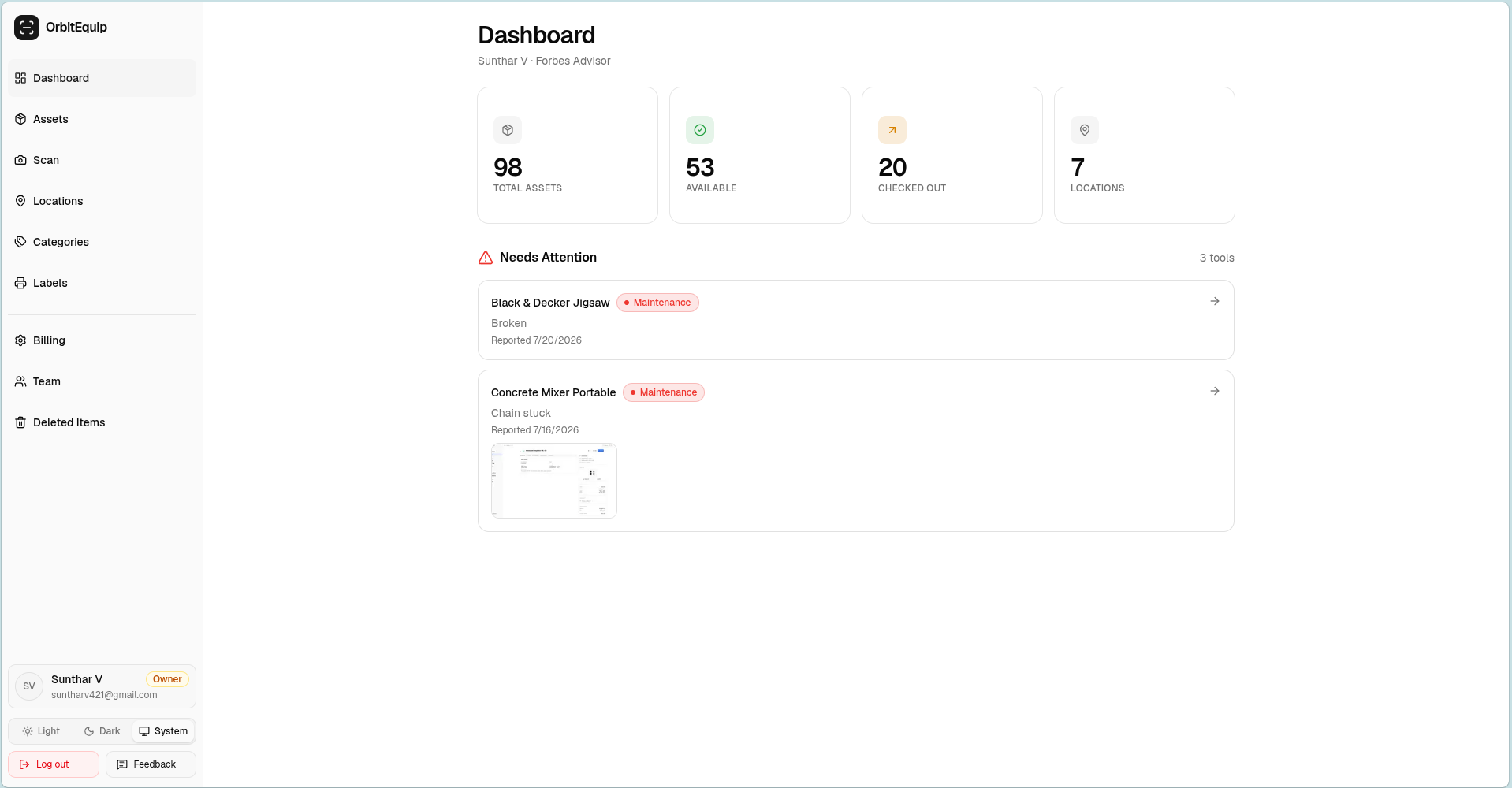
OrbitEquip focuses on contractor teams that need practical tool custody and return accountability without adopting a broader asset-lifecycle system. Teams can:
- Create a tool inventory,
- Generate QR labels,
- Check tools in and out,
- See who currently has an item,
- Organize tools across vans, jobsites or locations,
- View checkout history,
- Report equipment issues, and
- Scan from a phone browser.
Quick verdict: Choose AssetTiger if you need custom fields, depreciation, contracts, API access, service-cost reporting or broader lifecycle reporting. Choose OrbitEquip if crews need tool custody, optional due-back dates, overdue visibility, checkout reminder emails, physical audits and recurring preventive-maintenance schedules in a browser-based workflow.
For a broader category view, see our best tool tracking software comparison before choosing a product based on a single feature.
Disclosure:OrbitEquip publishes this comparison and is one of the products discussed. AssetTiger facts were researched from current official AssetTiger pricing, feature and documentation pages. We have not conducted a hands-on AssetTiger product test, so we do not claim firsthand experience where none exists. We explicitly identify situations where AssetTiger is the stronger fit.
OrbitEquip vs. AssetTiger at a glance
| Feature | OrbitEquip | AssetTiger |
|---|---|---|
| Best suited to | Contractors wanting focused tool custody tracking | Organizations needing broader asset lifecycle management |
| QR scanning | Yes | Yes |
| Identification | OrbitEquip QR is canonical; optional existing/manufacturer barcode identification and search | Barcode and QR camera scanning in its iOS/Android apps |
| Browser-based phone scanning | Yes | Browser access is available; phone scanning primarily uses the iOS/Android app |
| Native mobile apps | No | Yes, iOS and Android |
| Check-in / check-out | Yes | Yes |
| Locations | Yes | Yes |
| Checkout history | Yes | Yes |
| Return accountability | Optional due dates, overdue visibility and checkout reminder emails | Due dates and overdue email alerts |
| Custom fields | No user-defined custom fields | Yes; unlimited on paid plans |
| Maintenance issue reporting | Photos; open, in-progress and resolved status | Maintenance records, scheduling and alerts |
| Recurring preventive maintenance scheduling | Starter+ can create new schedules and receive maintenance reminder emails; existing schedules continue on Free | Yes, plus maintenance email alerts and history |
| Physical audit / reconciliation | Starter+ can start new audits; Free can view history and continue existing audits | Yes |
| Reservations / booking | No | Not described on its features page or FAQ; confirm with AssetTiger |
| Contracts / warranties | No | Yes |
| Depreciation | No | Yes |
| Inventory / stock management | No | Separate inventory plans or add-ons |
| REST API | No public customer API | Yes on paid plans |
| Asset photo and documents | One private primary asset photo; separate issue photos | Attachments such as insurance policies on asset records |
| Reports | Five fixed operational reports; filtered CSV export on Starter+ | 80+ built-in reports |
| Users | Unlimited | Unlimited on paid plans; up to 2 during trial |
| Free option | Permanent free plan, 25 tools, CSV import | 30-day trial, up to 250 assets |
| Paid starting price | $15/month, 500 tools | $20/month, 500 assets |
| Buying process | Self-serve | Self-serve |
Mainly need QR tool check-in/out?
Try OrbitEquip free with up to 25 tools.
Unlimited users. Browser-based scanning. No credit card required.
Which one should you choose?
Choose OrbitEquip if:
- Your central problem is tool custody, not complete asset lifecycle management.
- Tools move between employees, vans, jobsites or a tool crib.
- You need check-in/out, current-holder visibility, assigned locations and history.
- You need optional return due dates, overdue visibility and checkout reminder emails.
- You want crews to scan OrbitEquip QR labels from a browser.
- You need recurring preventive-maintenance schedules and maintenance reminder emails on an active Starter-or-higher subscription, without formal work orders.
- You do not need arbitrary custom fields.
- You do not need reservations.
- You do not need depreciation or contract tracking.
- You do not need API access.
- You want a permanent free tier and transparent self-serve pricing.
Choose AssetTiger if:
- Custom asset fields matter.
- You track many asset types beyond tools.
- You need service-cost reporting or a broader maintenance record model.
- Audits must span many asset types beyond tools.
- Contracts, warranties or insurance need tracking.
- Depreciation is required.
- You need REST API access.
- You want broad reports.
- You manage asset lifecycle from acquisition through disposal.
If those capabilities matter, OrbitEquip is not a like-for-like AssetTiger replacement.
“Who has the cable tester?”
OrbitEquip is designed around questions like this: which crew member has the tool, where it belongs, whether it is available, and what happened the last time it was checked out.
The biggest difference: asset lifecycle vs. tool custody
AssetTiger is an asset lifecycle platform
AssetTiger brings a broad set of asset-management workflows into one platform, including:
- Acquisition and asset records,
- Custom fields,
- QR and barcode identification,
- Check-in/out and custody history,
- Recurring maintenance schedules and email alerts,
- Physical audits and reconciliation,
- Contracts, warranties and insurance,
- Depreciation,
- Lease agreements, and a lifecycle that runs through disposal,
- Reporting, and
- REST API access.
That breadth makes AssetTiger relevant when a tool record must stay useful after the initial checkout. AssetTiger's website also has pages for IT, healthcare and small-business asset tracking.
OrbitEquip is a tool-custody system
Add tool → print QR label → scan → check out → check in → see history
OrbitEquip is designed to answer operational questions such as:
- What tools do we own?
- Where does this tool belong?
- Is it available?
- Who currently has it?
- When was it checked out?
- Has someone reported an issue with it?
For teams comparing equipment checkout software, OrbitEquip records custody and operational status, supports optional due dates, overdue visibility and checkout reminder emails, and provides one-time and recurring preventive-maintenance schedules. Active Starter-or-higher subscriptions also include physical inventory audits and maintenance reminder emails for eligible scheduled occurrences. OrbitEquip does not provide custom fields, reservations, lifecycle accounting or a public customer API.
QR and barcode scanning
AssetTiger scanning
AssetTiger supports:
- QR code scanning,
- Traditional barcode scanning,
- iOS and Android mobile apps,
- Scanning with the phone you already have, without dedicated scanner hardware, and
- Keyboard-emulating barcode scanners with its web app.
AssetTiger also provides browser access. The distinction here is not whether a browser exists; the official phone-scanning workflow is primarily through its iOS and Android apps, while OrbitEquip's QR scan workflow runs directly in a phone browser.
AssetTiger can scan QR codes and barcodes through its native apps. OrbitEquip also stores an optional existing/manufacturer barcode for identification and search, but QR remains its canonical custody code and it does not claim barcode camera scanning.
OrbitEquip scanning
OrbitEquip currently provides:
- OrbitEquip QR is canonical, with optional existing/manufacturer barcode identification and search,
- Printable QR labels from the product,
- Browser-based scanning from a phone,
- No native OrbitEquip app required, and
- Manual or browse-and-search fallbacks when scanning is not practical.
Read more about QR code tool tracking when the main requirement is intentional scan-based accountability across crews and locations.
Better suited to browser-based QR custody: OrbitEquip
Better suited to barcode camera scanning in native apps: AssetTiger
Custom fields and asset records
Configurable records versus fixed tool fields
AssetTiger supports user-defined custom fields for asset categories. Paid plans currently include unlimited custom fields, so an organization can capture details such as grant numbers, condition, purchase orders, department identifiers or other fields that matter to its own recordkeeping.
The current trial limits custom fields to 5.
OrbitEquip currently uses fixed fields such as:
- Name
- Category
- Location
- Serial number
- QR code
- Notes
OrbitEquip does not currently allow arbitrary user-defined custom fields. That keeps its tool record focused, but it means AssetTiger is the better fit when different asset categories need different record structures.
Better suited to configurable asset records: AssetTiger
Maintenance schedules, issue tracking and alerts
OrbitEquip maintenance
OrbitEquip currently supports:
- One-time planned maintenance,
- Recurring preventive-maintenance schedules,
- Pause/resume controls and the next occurrence after completion,
- Reactive issue descriptions and photos,
- Open, in-progress and resolved status,
- Resolution notes and history.
OrbitEquip supports recurring preventive-maintenance schedules and maintenance reminder emails for eligible scheduled occurrences on active Starter-or-higher subscriptions. AssetTiger adds broader service records and maintenance-related reporting.
AssetTiger maintenance
AssetTiger supports:
- Recurring maintenance schedules,
- Preventive maintenance by date or interval,
- Maintenance alerts,
- Maintenance history, and
- Maintenance-related reporting and costs.
If managers need service-cost reporting or a broader maintenance record model, AssetTiger is better suited. Both products support recurring schedules and maintenance email reminders; OrbitEquip's reminders require an active Starter-or-higher subscription.
Better suited to service records and maintenance cost reporting: AssetTiger
Physical inventory audits and reconciliation
Scan and reconcile inventory
AssetTiger provides physical-audit and reconciliation workflows. Teams can walk a site with the mobile app, scan asset tags, and produce a report showing what was found, missing or moved.
Active Starter-or-higher subscriptions include physical inventory audits with scan verification and explicit reconciliation. Free organizations can view existing audit history and finish or reconcile an audit already in progress.
Both products support physical audits; compare the specific scan, reconciliation, reporting and administration workflows your team needs.
Both products support physical inventory audits
Contracts and asset lifecycle
When the asset record must follow the whole lifecycle
AssetTiger's features page and FAQ describe records for:
- Service contracts and lease agreements,
- Warranty expirations,
- Insurance policies, coverage amounts and renewal dates,
- Grants, funds and budget codes,
- Depreciation reports, and
- Tracking from acquisition through disposal as a lifecycle stage.
These capabilities matter when equipment needs more than a current holder and a location. They can connect the operational record to acquisition, scheduled use, financial treatment, expiry dates and final disposal.
OrbitEquip currently does not provide reservations, bookings, contracts, warranties, insurance, fund tracking, depreciation, lease workflows or disposal lifecycle management.
Many specialty contractors may not need those workflows for ordinary shared-tool custody. If the requirement is simply to know which employee, van or jobsite has a tool, a focused system may be sufficient.
Reporting and integrations
Operational visibility versus reporting and API depth
AssetTiger currently advertises:
- 80+ built-in report types,
- CSV, Excel and PDF export,
- Depreciation and audit reconciliation reporting, and
- A REST API with create, read, update and delete access to 14 resource groups, a sandbox and Swagger documentation, with API access included in paid plans.
That makes AssetTiger the better candidate when asset records need to connect to another system or reporting process.
OrbitEquip provides five fixed operational reports, with report viewing available on Free. Filtered CSV export is available on active Starter-or-higher subscriptions.
OrbitEquip does not expose a public customer REST API or an 80+ report library. It should not be evaluated as an API or enterprise-reporting replacement for AssetTiger.
Better suited to reporting and system integration: AssetTiger
AssetTiger pricing vs. OrbitEquip pricing
OrbitEquip
| Plan | Monthly price | Tool limit |
|---|---|---|
| Free | $0 | 25 |
| Starter | $15 | 500 |
| Pro | $35 | 2,500 |
| Business | $70 | 10,000 |
| Enterprise | Custom | Custom |
OrbitEquip includes unlimited users across its current plans.
Free covers up to 25 tools and includes CSV import and fixed report viewing. Active Starter-or-higher subscriptions add filtered CSV export, starting new physical audits, creating new recurring schedules, and Maintenance Reminder Emails. Paid plans start at $15/month for 500 tools. See the full OrbitEquip pricing page for current plan details.
AssetTiger
| Plan | Monthly price | Asset limit |
|---|---|---|
| Trial | $0 for 30 days | 250 |
| Basic | $20 | 500 |
| Core | $40 | 2,500 |
| Advanced | $75 | 10,000 |
| Pro | $140 | 50,000 |
| Enterprise | $275 | 250,000 |
AssetTiger currently offers a 30-day trial with no credit card, up to 250 assets and up to 2 users.
Paid plans have unlimited users and scale by asset count:
- $20/month for 500 assets,
- $40/month for 2,500 assets,
- $75/month for 10,000 assets,
- $140/month for 50,000 assets, and
- $275/month for 250,000 assets.
At comparable limits, OrbitEquip is $15 versus AssetTiger's $20 for 500 items, $35 versus $40 for 2,500, and $70 versus $75 for 10,000.
The real difference is not just price. AssetTiger includes significantly more functionality, and its paid plans currently provide the same broad feature set rather than feature-gating core capabilities by tier.
AssetTiger's inventory and stock-management plans are separate from its asset plans. Confirm the current plan, add-ons and billing terms directly with AssetTiger before purchasing.
Where AssetTiger is better than OrbitEquip
AssetTiger is the stronger candidate when your tracking system needs to support more than tool custody.
Custom fields
User-defined fields let teams capture details that differ by asset category. Paid plans currently include unlimited custom fields.
Maintenance alerts and service records
AssetTiger adds broader service records and maintenance-related cost reporting. Both products support recurring preventive-maintenance schedules and maintenance email reminders (OrbitEquip on active Starter-or-higher subscriptions); the difference is record and reporting depth, not recurrence or reminders.
Physical audits
The mobile workflow supports physical audits and reconciliation reports showing what was found, missing or moved.
Contracts and warranties
Track contracts, warranties, insurance and expiration information alongside asset records.
Depreciation
AssetTiger includes depreciation workflows and reports for organizations that need financial asset records.
Asset lifecycle workflows
Acquisition, assignment, disposal and other lifecycle stages fit inside the wider asset model.
Reports
More than 80 built-in report types cover areas such as audits, checkout history, maintenance and depreciation.
REST API
Paid plans include REST API access for connecting asset data to other systems and workflows.
Mobile barcode scanning
AssetTiger can scan traditional barcodes and QR codes through its iOS and Android apps. OrbitEquip can store and search an optional existing/manufacturer barcode, but does not claim barcode camera scanning.
Native mobile apps
iOS and Android apps let you scan a tag to view, check out or update an asset from a phone or tablet.
Broader asset types
AssetTiger describes tracking across tools, equipment and consumables, and its website has pages for IT and healthcare teams.
If these capabilities are central requirements, choose AssetTiger.
Where OrbitEquip is better suited
Illustrative buyer description:
“We don't need a full asset lifecycle system. We need to know who has each tool.”
OrbitEquip's case is much narrower.
It is suited to teams that want:
- Contractor and tool-custody specialization,
- Browser-based QR scanning,
- A permanent free tier,
- Slightly lower entry pricing at comparable lower asset limits,
- A focused workflow, and
- Simple operational accountability across crews, vans and jobsites.
Less lifecycle management, more focus on tool custody.
Real-world decision examples
These are illustrative buying scenarios, not OrbitEquip customer case studies or testimonials.
15-person electrical contractor, 300 tools
Needs:
- Testers
- Drills
- Benders
- Service vans
- Crew accountability
No depreciation, contracts or custom fields.
Start with OrbitEquip.
School district managing laptops, AV gear and warranties
Needs:
- Custom fields
- Warranties
- Depreciation
- Reports
- Contracts
- Broad asset types
AssetTiger is likely the stronger fit.
25-person HVAC company with 500 serialized tools
Main need:
Current holder, vans, check-in/out and issue reporting.
OrbitEquip is a sensible first evaluation.
Facilities team managing equipment lifecycle
Needs:
- Recurring service
- Warranties
- Audits
- Contracts
- Depreciation
AssetTiger is more appropriate.
Organization needing API integration
Asset records need to connect to another system through a public API.
Choose AssetTiger.
OrbitEquip does not currently provide equivalent public API capability.
For an electrical contractor focused on tool custody, our tool tracking guide for electricians provides additional context.
Switching from AssetTiger to OrbitEquip
Validate the workflow before changing the subscription
Do not switch purely on price.
Moving from AssetTiger to OrbitEquip may remove or require replacing:
- Custom fields,
- Service-cost reports and broader maintenance records,
- Audit and reconciliation data,
- Depreciation,
- Contracts, warranties and insurance,
- API integrations, and
- Advanced reporting.
If AssetTiger is mainly being used for:
- Tools
- Locations
- Check-in/out
- Current custody
- Simple history
then OrbitEquip may be worth evaluating as a narrower alternative.
OrbitEquip supports CSV import on Free within its 25-asset limit and on paid plans. That can help bring over a basic asset list, but it does not promise lossless migration of every AssetTiger field, workflow, attachment, audit record, depreciation schedule or integration.
Export and validate your AssetTiger data before canceling the existing system.
Switching from AssetTiger? Book a free 15-minute setup call and send your export.
We'll import your tool list into OrbitEquip with you on the call. The import covers name, category, location, status, notes, serial number and existing barcode. History, custom fields, photos and attachments don't move. Owners and Admins run the import, and your plan's asset limit applies (Free: 25 tools).
Final verdict
AssetTiger is better when:
You need broader asset lifecycle management.
That can include:
- Custom fields,
- Broader maintenance records and cost reporting,
- Audits across broad asset types,
- Depreciation,
- Contracts,
- Reports, and
- API access.
OrbitEquip is better suited when:
The problem is narrower:
Put QR labels on tools, check them in and out, and see who currently has what.
If that is the problem you are trying to solve, a broad asset-lifecycle platform may not be necessary. If it is not, OrbitEquip is too narrow for your needs.
See if the focused workflow is enough
Start with OrbitEquip's free plan and add a handful of real tools.
Print labels, have your crew check them in and out, and test the workflow with your actual equipment.
Free for up to 25 tools. Unlimited users. No credit card required.
Frequently asked questions
Is OrbitEquip a complete replacement for AssetTiger?
No.
AssetTiger is a broad asset lifecycle platform. OrbitEquip focuses on tool custody: browser-based QR check-in/out, current holder and assigned location, checkout history, optional return due dates, overdue visibility, checkout reminder emails, recurring preventive-maintenance schedules, one primary asset photo and optional existing/manufacturer barcode identification/search.
AssetTiger is likely the stronger fit if you need custom fields, contract, insurance or fund tracking, depreciation reports, consumable stock tracking, its 80+ built-in report types, or its REST API.
Does AssetTiger still have a free plan?
AssetTiger currently offers a 30-day free trial for up to 250 assets rather than a permanent free asset-management plan. Its pricing page also lists a free tier for 2 inventory items, which is a separate add-on.
The trial does not require a credit card and currently allows up to 2 users. Paid plans start at $20/month for up to 500 assets.
Does AssetTiger have unlimited users?
Yes. AssetTiger paid plans currently include unlimited users. The free trial is limited to up to 2 users.
Does AssetTiger support custom fields?
Yes. AssetTiger supports user-defined custom fields, and paid plans currently include unlimited custom fields. The 30-day trial currently allows up to 5 custom fields.
Does OrbitEquip support custom fields?
No. OrbitEquip currently uses fixed tool-record fields such as name, category, location, serial number, QR code and notes. It does not currently provide arbitrary user-defined custom fields.
Does AssetTiger have preventive maintenance?
Yes. AssetTiger's home page describes scheduling preventive maintenance by date or interval, recurring maintenance, and email alerts before items go overdue.
Does OrbitEquip have preventive maintenance?
OrbitEquip supports reactive issue reporting with photos and open, in-progress and resolved status, one-time planned maintenance, and recurring preventive-maintenance schedules with pause/resume and next occurrences. Maintenance reminder emails for eligible scheduled occurrences are available on active Starter-or-higher subscriptions.
Does AssetTiger have barcode and QR scanning?
Yes. AssetTiger's home page says you can print barcodes or QR codes on any label printer and scan them with a phone. Its iOS and Android apps are listed as the scanner.
Does OrbitEquip scan barcodes?
OrbitEquip QR remains the canonical identifier. Teams can also store an optional existing/manufacturer barcode for identification and search, including CSV mapping and authenticated lookup. Barcode camera scanning is not claimed.
Which is better for contractors?
It depends on the workflow. OrbitEquip is worth evaluating when a contractor mainly needs tool custody across employees, vans, jobsites or a tool crib: check-in/out, current-holder visibility, locations, history and issue reporting.
AssetTiger is more appropriate when the contractor needs custom fields, depreciation, contracts, broader reports, barcode scanning from native apps, or API access. Its maintenance advantage is broader service records and cost reporting; both products support recurring schedules and maintenance email reminders.
How this comparison was researched
This comparison was reviewed against publicly available AssetTiger information on November 3, 2026, including:
- Official AssetTiger pricing and plan comparison
- Official AssetTiger feature documentation
- Official AssetTiger asset-management overview
- Official AssetTiger tool-tracking overview
- Official AssetTiger FAQ
- Official AssetTiger REST API documentation
OrbitEquip information reflects the generally available V2 product.
Competitor products change. Verify critical pricing and feature requirements directly with AssetTiger before purchasing. For another competitor comparison, see the ToolWatch alternative comparison.
Last researched: November 3, 2026
About the author
Sunthar
Founder of OrbitEquip
Sunthar is the founder of OrbitEquip, where he’s building simpler tool and equipment management software for contractors and trade teams. He writes about tool accountability, QR-based check-in and check-out, and practical ways to keep track of shared equipment across teams and jobsites.
View author profile